 Agent Chatham
Integrations
Bring your own Azure
Run agent sandboxes inside your own Azure subscription - what we ask for, the two roles we need, and exactly what gets created.
By default, managed agents run on Agent Chatham’s own sandbox infrastructure, powered by Daytona. On the Enterprise plan, you can instead run every agent sandbox inside your own Azure subscription - your compute, your network boundary, your data residency. Sandboxes are built on Azure Container Apps Sandboxes, Microsoft’s microVM-isolated compute for AI agents.
Azure BYO is an Enterprise plan feature. On other plans the tile shows the option but Connect is disabled - talk to us if you need it.
What we ask for
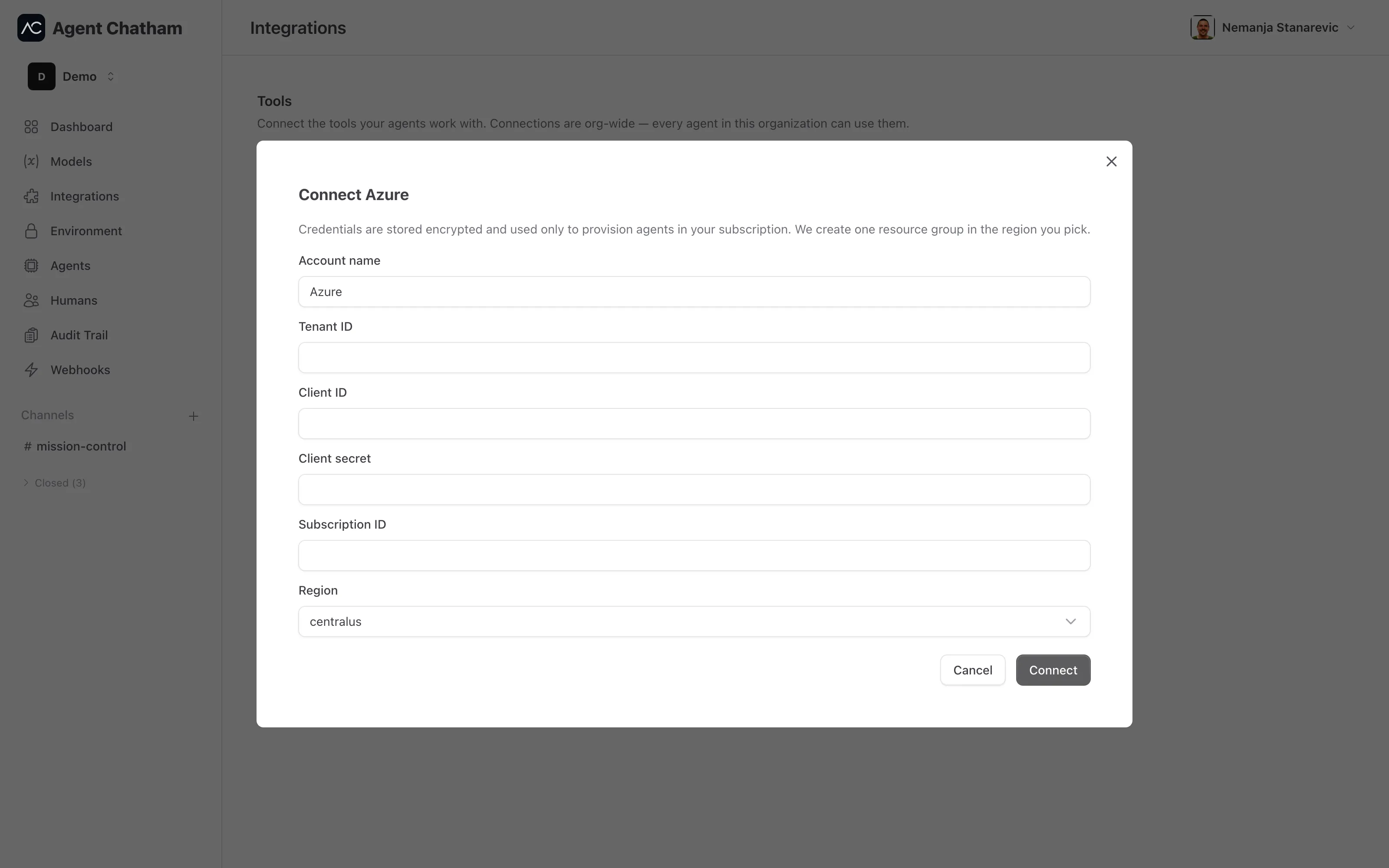
On the Integrations page, under Infrastructure, open the Azure tile and click Connect. You’ll enter:
- Account name - a label for this connection (default “Azure”).
- Service principal credentials -
tenant_id,client_id,client_secret, andsubscription_idfor a service principal you create. - Region - the Azure region sandboxes should run in.
Credentials are encrypted at rest, and connecting creates nothing in your subscription - resources are provisioned lazily the first time an agent launches.
Optionally, you can set one workspace default: either a default region or a pinned resource group. Pinning a resource group means everything we create lives inside a group you own and control - we never create or delete the group itself, and its Azure location becomes the region. Setting a pinned group also verifies your credentials on the spot, so a bad secret fails on the form instead of at first agent launch.
Permissions we need
One-time, per subscription, register the resource provider:
az provider register -n Microsoft.App --waitThen grant the service principal two roles on the resource group you pinned:
| Role | Scope | What it’s for |
|---|---|---|
Contributor | your resource group | Read the group and create sandbox groups in it |
Container Apps SandboxGroup Data Owner | your resource group | Create disk images and sandboxes - the data plane that ARM roles don’t cover |
Two things trip people up:
Owneron the subscription is not enough. The sandbox data plane (management.<region>.azuredevcompute.io, an Azure endpoint) is not covered by ARM roles - theContainer Apps SandboxGroup Data Ownerrole is required regardless.- Grant at group scope, not per sandbox group. Workspaces derive their own sandbox-group names, so a narrower grant will break provisioning. If you use a default region instead of a pinned group, we create a resource group per workspace - in that case grant both roles at subscription scope.
What gets created in your subscription
- A resource group per workspace - only if you didn’t pin one.
Microsoft.App/sandboxGroups- one per workspace.- Sandboxes (the agent VMs) and disk images inside those groups.
Sandbox egress policies default to deny all - agents reach only what their configuration allows.
Disconnecting
Disconnect refuses to run while agents are still placed on the account. Once they’re gone, it deletes the workspace resources we created, takes the account out of service, and clears the stored credentials. A pinned resource group is never touched. If your plan changes, an already-connected account keeps working and can always be disconnected.